View the example grid
If a digit’s candidates in a box all lie in one row or column, that digit cannot appear elsewhere on that line outside the box. This is one form of Locked Candidates.
An example from the app
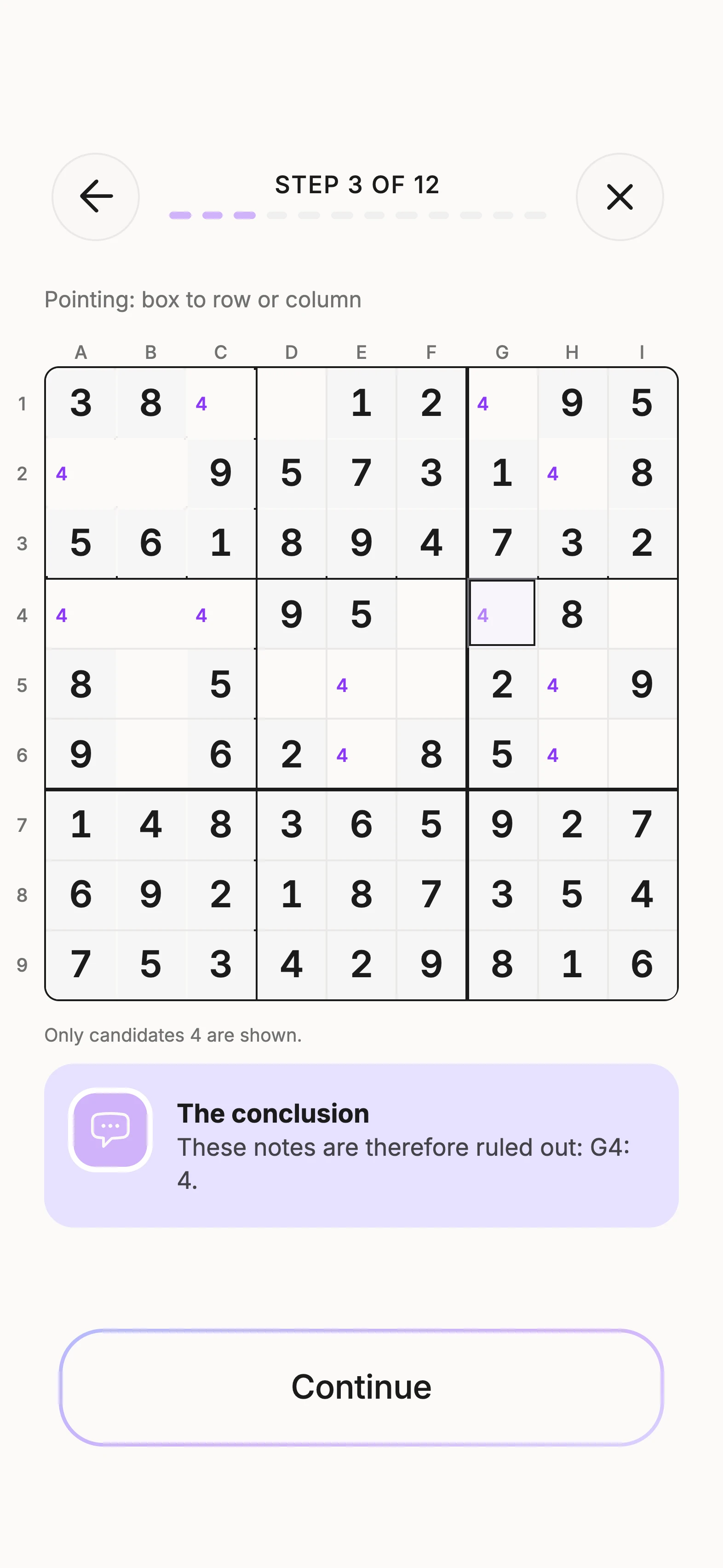
In box 4, 4 fits only in A4, C4. Those cells all lie in row 4.
The box’s 4 must therefore be in row 4. It cannot appear again on that line outside the box. This is Pointing: from box to row or column.
These notes are therefore ruled out: G4: 4.
The image shows the candidates relevant to this step. A note being hidden does not mean it has been logically eliminated.
Practice the next step
Check every possible position of the digit in the box. The reverse direction, from line to box, is another variation you can practice in the app.
In the app, follow the reasoning in the matching lesson and try a task yourself. With a new puzzle, always start from its actual candidate state.
Questions about Locked Candidates
Which areas does Locked Candidates connect?
A row or column and a 3×3 box. One area restricts all positions of a digit to their shared line.
Must there be exactly two candidates?
No. What matters is the restriction of every position of that digit, rather than a fixed number of visible notes.
Where can I eliminate the digit?
From box to line, eliminate outside the box on that line. From line to box, eliminate inside the box outside the starting line.
Are two candidates next to each other enough?
No. The starting area must have no other position for that digit outside the shared line.
Does the method work with columns?
Yes. The box–column relationship follows the same reasoning as the box–row relationship.
Keep practicing in Unisu
Download Unisu for iPhone or Android. Solve a puzzle or work through a guided lesson on the technique.